LetAlexzandrea, of Indiana be your summer inspiration, for getting your extra weight off and keeping it off permanently. Having lost a huge 50 lbs and going down from a Size 16 to a Size 7, in just a few months, using The Fat Predator DietCapsules and The Diet Intensifier's. Our Fat Predatorand Diet Intensifier's help you to cross train your body down to the size you want to see, and become the person you want to be, just as Alexhas.Alexlooks simply beautiful as she keeps the weight off! Her weight loss journey has been more than 7 YEARS ago. After loosing weight, she now takes her capsules every blue moon, for maintenance, on days that she eats more then normal, like summer barbecues, parties and holidays. Now it's your turn to get the the body and the life you want. Visit us at www.fatpredator.com or call us at 219-769-8320.
The (4) Levels of Fat Predator Diet Capsulesare a powerful fat burning tool, to help you lose weight and get you to the size you want to see. But, did you know that one of Fat Predator Diet Capsule's greatest Allies is simple "WATER"? Why? Because, drinking 64 - 90oz of water daily, helps to create the flushing action that is needed to remove Toxins, Free Radicals and Fat Cells. The same Fat Cells that are reduced with the use of Fat Predator Diet Capsule and/or The Diet Intensifiers. So, kept that in mind when losing weight. Whether you are thirsty or not, drink you water! Water is your friend. Really.
Losing weight and keeping it off in the summertime, can be much more easily done than you think, with a few consistencies. 1st. Take your Fat Predator Diet / Weight Loss Capsules daily, every morning with breakfast. 2nd. Drink plenty of water. Water cools you down and help to flush fat cell (lipids) from your body, as you are losing weight on The Fat Predator Diet Capsules. Finally, once a day exchange one of your meals for a cool refreshing salad. Today try our cucumber and grape salad recipe. It's do easy to make.
Use left/right arrows to navigate the slideshow or swipe left/right if using a mobile device
choosing a selection results in a full page refresh
press the space key then arrow keys to make a selection
Language
English
Français
Italiano
Español
English
PayPal Pay Later Messaging
Step 1: Choose message placement
Click the button below and then hover over your page to select a placement.
Step 2: Paste and save
You have copied the placement for the Product Page.
Go back to the App Embeds section, and in the Paypal Advanced Settings, paste the copied value into the
Product Page field and click the 'Save' button in the top right corner.


 Let Alexzandrea, of Indiana be your summer inspiration, for getting your extra weight off and keeping it off permanently. Having lost a huge 50 lbs and going down from a Size 16 to a Size 7, in just a few months, using The Fat Predator Diet Capsules and The Diet Intensifier's. Our Fat Predator and Diet Intensifier's help you to cross train your body down to the size you want to see, and become the person you want to be, just as Alex has. Alex looks simply beautiful as she keeps the weight off! Her weight loss journey has been more than 7 YEARS ago. After loosing weight, she now takes her capsules every blue moon, for maintenance, on days that she eats more then normal, like summer barbecues, parties and holidays. Now it's your turn to get the the body and the life you want. Visit us at www.fatpredator.com or call us at 219-769-8320.
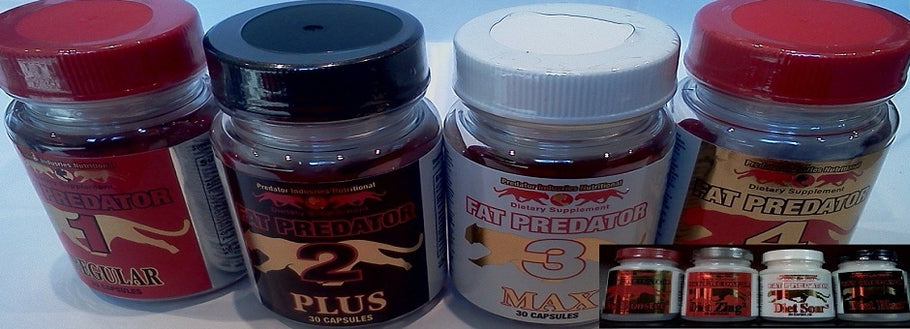 The (4) Levels of Fat Predator Diet Capsules are a powerful fat burning tool, to help you lose weight and get you to the size you want to see. But, did you know that one of Fat Predator Diet Capsule's greatest Allies is simple "WATER"? Why? Because, drinking 64 - 90oz of water daily, helps to create the flushing action that is needed to remove Toxins, Free Radicals and Fat Cells. The same Fat Cells that are reduced with the use of Fat Predator Diet Capsule and/or The Diet Intensifiers. So, kept that in mind when losing weight. Whether you are thirsty or not, drink you water! Water is your friend. Really.
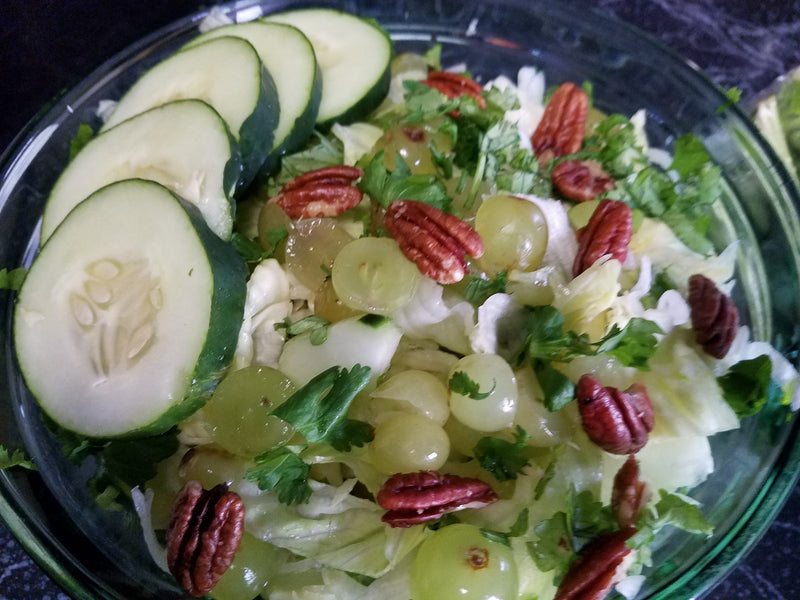 Losing weight and keeping it off in the summertime, can be much more easily done than you think, with a few consistencies. 1st. Take your Fat Predator Diet / Weight Loss Capsules daily, every morning with breakfast. 2nd. Drink plenty of water. Water cools you down and help to flush fat cell (lipids) from your body, as you are losing weight on The Fat Predator Diet Capsules. Finally, once a day exchange one of your meals for a cool refreshing salad. Today try our cucumber and grape salad recipe. It's do easy to make.


